
How to Protect Your Social Security Account From Fraud starts with securing my Social Security, the U.S. Social Security Administration’s online records portal. If someone can sign into your Social Security account, they may see tax forms and try changing benefit payments.
Protect its Login.gov sign-in and check the record for changes you never made.
The SSA says it will never ask for your password or a one-time security code. Current NIST digital identity guidance, SP 800-63B, calls for phishing-resistant authentication at higher assurance levels. As of 2026, your strongest setup is a unique password, multifactor authentication, current recovery details, and regular record checks.
Here’s the practical routine.
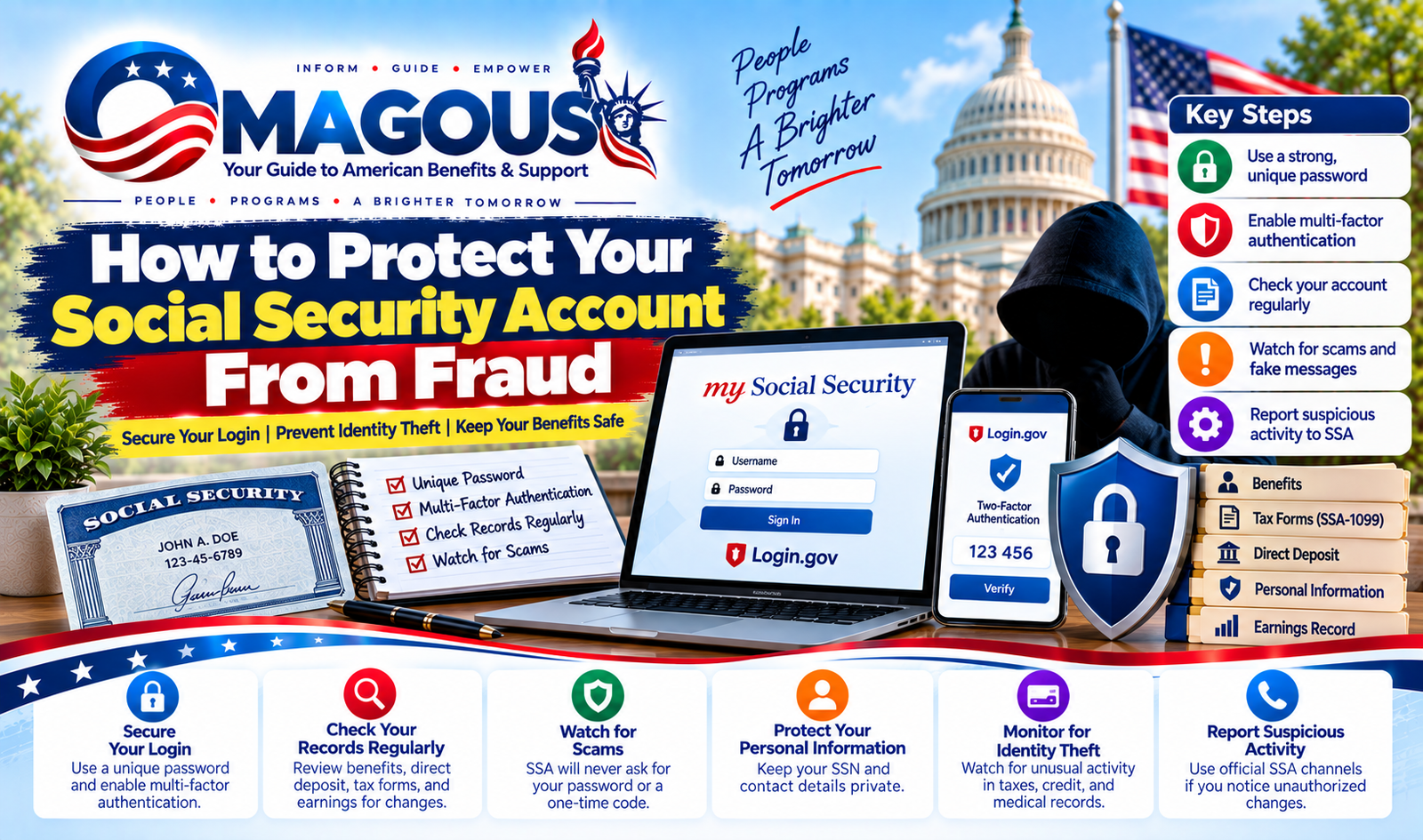
How to Protect Your Social Security Account From Fraud
Quick Answer
How to Protect Your Social Security Account From Fraud needs strong login security. Use a unique password and multifactor authentication for Login.gov. Never share passwords or one-time codes with callers.
Review benefits, direct deposit, contact details, and earnings each year. Report suspicious access through official SSA channels immediately.
How Social Security Fraud Works and What’s Actually at Risk
My Social Security is a records portal, not a bank account. It can contain benefit details, tax forms, direct-deposit information, contact data, and your annual earnings statement. A criminal who gains access may steal information or attempt to redirect payments.
Account Takeover and Login.gov Credential Theft
An account takeover means someone gains unauthorized control of your existing account. Attackers often start with reused passwords, compromised email accounts, fake reset pages, malware, or stolen verification codes.
Control of your recovery email is especially dangerous. A criminal may reset your Login.gov password, replace your authentication method, and change your contact details. Review password resets, new multifactor methods, linked accounts, and security emails as urgent warning signs.
Stolen Benefits and Direct-Deposit Diversion
Direct deposit sends your benefit payment electronically to a bank account. A criminal may try to replace those banking details with an account they control.
Benefit theft can also happen without a Social Security account takeover. Someone may file a fraudulent claim, use a stolen identity, or seek appointment as a representative payee. A representative payee is someone legally authorized to receive and manage benefits for a beneficiary who can’t handle them independently.
SSN Misuse for Tax, Medical, and Credit Fraud
The Social Security number (SSN) can be misused outside SSA records. Criminals may use it to file tax returns, obtain medical services, open credit accounts, or create other fraudulent accounts.
A credit freeze helps block new credit, but it doesn’t secure my Social Security. SSA records, tax accounts, medical identities, and credit files each need separate protection and monitoring.
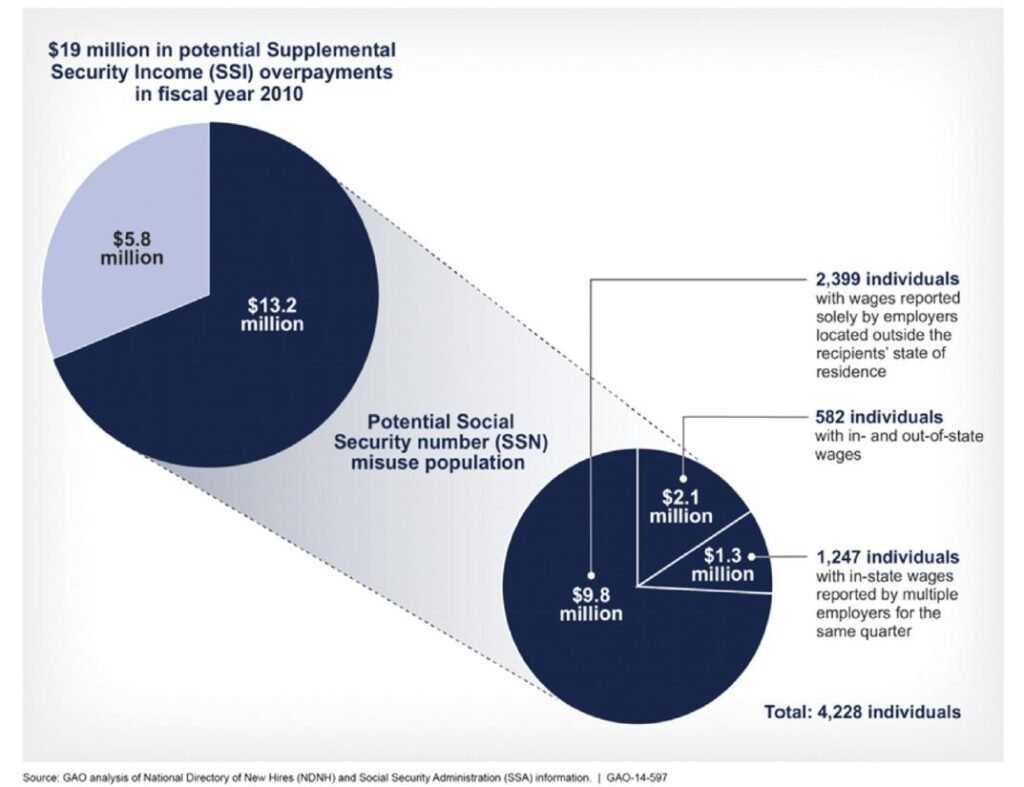
The image below comes from a fiscal year 2010 Government Accountability Office analysis of possible SSN misuse among Supplemental Security Income recipients. It documents historical risk, not a 2026 fraud rate.
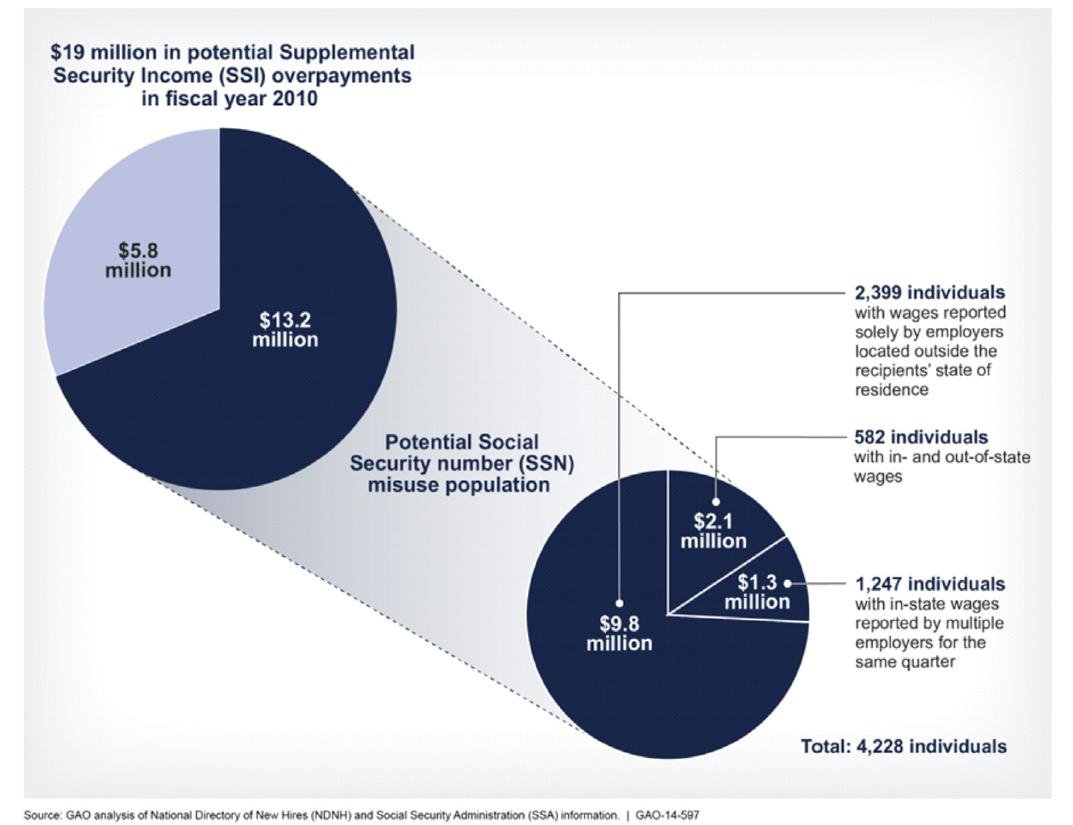
Image source: Wikimedia Commons / U.S. Government Accountability Office from Washington, DC, United States
Fraudulent Earnings and Representative-Payee Changes
False wages can increase the earnings figure used to calculate retirement or disability benefits. Missing wages can have the opposite effect. Either problem can leave your benefit amount or tax documents looking wrong.
Compare unfamiliar entries with your W-2 forms and tax records. If wages are missing, use this missing-earnings checklist. If the record is corrected but the benefit remains wrong, the benefit recalculation guide explains the next step.
Red Flags: Fake SSA Messages, Calls, Pages, and Account Changes
Fraudsters often want you to react before you have time to check. Messages may threaten benefit suspension, unusual activity, unpaid taxes, arrest, or legal action. The pressure is intentional.
Phishing Emails, Smishing Texts, and Vishing Calls
Phishing uses a fake message or page to collect sensitive information. Smishing arrives by text. Vishing uses a phone call.
Watch for requests for:
- Your Login.gov or Social Security password
- A one-time security or approval code
- Bank account, routing, or card information
- A remote-control application or unexpected download
- An unfamiliar payment, gift card, or wire transfer
Don’t reply, call the number in the message, or open its attachment. The SSA’s official scam guidance explains how government impersonation scams work.
Caller ID Spoofing and Lookalike SSA Websites
A caller ID number can be faked. Even a call that appears to come from SSA may belong to someone else. If someone asks for sensitive information, hang up and verify the issue independently.
Sponsored search results can also lead to imitation websites. Type ssa.gov directly into your browser or use a trusted bookmark. Check the address carefully before signing in.
Unexpected Changes Inside my Social Security
Treat any change you didn’t request as a security event. Pay special attention to a new bank account, address, phone number, email address, or representative payee.
| Warning sign | What it could mean | Safe response |
|---|---|---|
| New benefit claimant | Possible unauthorized claim | Contact SSA through an official channel |
| New bank details | Possible payment diversion | Contact SSA and your bank |
| Password or MFA reset | Possible account takeover | Secure email and Login.gov |
| Unknown email or phone | Recovery details may be compromised | Review and correct them |
| Unfamiliar representative payee | Possible benefit theft attempt | Verify the appointment |
| Unexpected DOB change | Identity records may be inaccurate | Use birth-record correction steps |
Secure Your my Social Security and Login.gov Accounts

Image source: Wikimedia Commons / Alexander Klink (CC BY)
My Social Security and Login.gov are free government services. Their security still depends on the email address, phone number, password manager, and devices connected to your identity.
Start at the Official SSA Website
Open ssa.gov yourself and select the option for my Social Security. Don’t begin with a link in an email, text, social post, or search result.
If you don’t already have an account, follow SSA’s sign-up process. If online identity verification fails, use SSA’s official phone or field-office options. Repeatedly creating new accounts can complicate recovery later.
Protect Your Email and Create a Unique Password
Secure your primary email account first. Login.gov can use it for password resets and security notices. An email takeover can therefore become a Social Security account takeover.
Use a unique passphrase of at least 16 characters where accepted. A password manager makes this easier. Don’t reuse that password for banking, email, or shopping accounts.
If the same password appears in a data breach, change it on the affected service. Changing only one account may not protect the others.
Set Up the Strongest Available Multifactor Authentication
Multifactor authentication adds a verification step after your password. As of 2026, Login.gov supports options such as authenticator apps, text or voice codes, backup codes, and security keys for eligible accounts.
A security key is the strongest option when your setup supports it. An authenticator app is generally safer than text messages because its code doesn’t travel through the mobile network. Never approve a prompt you didn’t start.
Text and voice codes still work for some people, but they’re more exposed to SIM swapping. SIM swapping is a scheme that transfers a phone number to another device or person. A carrier PIN or port-out lock can make that transfer harder.
The image below shows a data-center hardware security module. It’s related to hardware-backed security, but it isn’t the small security key most people would use with Login.gov.
Image source: Wikimedia Commons / Alexander Klink (CC BY)
Use backup codes only on the Login.gov sign-in you initiated yourself. Store them securely and separately from your phone or computer. Never send a code to anyone claiming to work for SSA, Login.gov, or a bank.
Review Recovery Details and Linked Accounts
Keep your recovery email and phone number current. Remove old addresses and numbers you no longer control. If you recently changed carriers, confirm the number before relying on text verification.
Review linked accounts, active sessions, and authentication methods when those controls are available. Remove anything unfamiliar. A password change may not end every active session, so close the old session too.
If a trusted person helps you, use official authorized permissions. Don’t share your password. A power of attorney or family relationship doesn’t automatically create secure online access for that person.
Review Benefits, Direct Deposit, Earnings, and SSA-1099 Details
A secure login doesn’t guarantee that every record is correct. Review your information at least annually, after tax season, and whenever you receive a security alert.
| Area | What to check | Warning sign |
|---|---|---|
| Personal record | Name, birth date, address | Any unapproved change |
| Contact details | Email and recovery phone | Old or unfamiliar information |
| Benefits | Claimant, type, amount, status | Extra claim or sudden change |
| Direct deposit | Bank, routing, account number | New banking details |
| Earnings | W-2 wages and self-employment income | Unknown or missing entries |
| Tax form | SSA-1099 benefit total | A mismatch with your tax return |
| Representative payee | Name and legal authority | An unexpected change |
Check for Unauthorized Benefit or Payment Changes
Review the benefit type, claimant, payment status, amount, and schedule. Direct deposit means the SSA sends your payment electronically to a listed bank account.
A new bank name, routing number, or account number needs immediate attention. Contact SSA through ssa.gov or an official phone number. Contact your bank using the number on its website, card, or statement.
Don’t use contact details supplied by a suspicious caller.
An incorrect overpayment isn’t always identity fraud. SSA errors and payment calculation issues happen. You still need a written explanation and case reference before treating the balance as legitimate.
If a payment was stopped or returned, work through this reversed-payment checklist while your bank investigates.
Compare Earnings With Your W-2 and Tax Records
Compare the annual statement with every W-2 wage total for that year. Self-employment earnings generally come from Schedule SE and may not appear on a W-2.
Corrections can take time to move from the IRS to SSA. A recent mismatch isn’t automatic proof of fraud. If the error remains, request a formal record correction and keep copies of the supporting forms.
Then compare the benefit calculation with your corrected earnings. If a claim was denied or the amount remains wrong after correction, review the benefit recalculation guide.
Review Your SSA-1099, Representative Payee, and Contact Details
The SSA-1099 is the tax form showing Social Security benefits credited during a year. Compare it with your federal tax return. If your return used the wrong amount, correct the SSA record and follow the appropriate IRS process.
Review any representative payee listed in your record. A legitimate payee must have proper legal authority. Use this representative payee guide to check an appointment or requested change.
Finally, confirm your address, email, and phone. An incorrect birth date can complicate identity verification, so use the SSA correction process if needed. Set an annual reminder to repeat the full review after your tax documents become available.
Protect Your Full SSN, Documents, Mail, and Credit File
Protecting the login is only one layer. Your full SSN, paper records, mailbox, bank account, and credit file can each expose you elsewhere. Treat these as separate security targets.
Limit Where You Use and Disclose Your Full SSN
Provide your full SSN only when a verified organization has a lawful need for it. Employers, tax agencies, and financial institutions may require it. A survey, store, landlord, or unsolicited caller usually doesn’t.
Before giving it, verify the organization and purpose. Use the last four digits when full identification isn’t legally required. Don’t assume this shortcut is always acceptable, so check the requesting form first.
Keep your Social Security card in a locked place at home. Don’t carry it with other identity documents unless you need it. A locked wallet or password manager can protect digital and paper copies differently.
Secure and Shred SSN-Bearing Documents
Limit the number of papers showing your full SSN. Keep originals in a locked filing cabinet. Store digital copies in an encrypted folder rather than your desktop or Downloads folder.
Cross-cut shred papers before placing them in recycling. A regular shredder may leave narrow strips that can still be reconstructed.
- W-2 forms and tax returns
- SSA-1099 forms and benefit notices
- Medical bills and insurance records
- Bank statements and loan applications
- Old checks and payment registers
Check your mail daily. Report missing statements promptly. If paper checks are stolen, record the payment dates and contact SSA and your bank.
Use a Credit Freeze, Fraud Alert, and Free Credit Reports
A credit freeze blocks new credit until you temporarily lift it. Place a freeze with Equifax, Experian, and TransUnion for the broadest protection.
| Option | Best use | Cost | Main limitation |
|---|---|---|---|
| Credit freeze | Blocking new credit | Free | Must be lifted for some applications |
| Fraud alert | Warning creditors to verify you | Free | Must be renewed periodically |
| Credit monitoring | Watching for new accounts | Varies | Doesn’t prevent account creation |
A fraud alert stays on a credit file for one year. You can renew it and may qualify for free monitoring. Review reports at AnnualCreditReport.com, the federally authorized central service.
If your SSN appeared in a breach, a freeze is still useful. Don’t wait for a fraudulent account to appear before taking action.
Protect Benefit Checks and Direct Deposit
Direct deposit reduces the risk of stolen mail, but it links your benefit payment to a bank account. Review banking alerts and statement activity. Keep your bank’s phone number and app credentials secure.
Paper checks create different risks. Mail theft may expose your name, address, SSN, payment amount, and bank details. If you lose one, report it quickly.
Don’t include the full SSN on the replacement request.
If You Clicked, Shared a Code, or Suspect a Takeover: Act in This Order
Speed matters after a security incident, but random password changes can leave an account exposed. Work outward from the account that controls your email and phone access.
If You Received a Suspicious Message but Didn’t Interact
Delete an obvious scam message after preserving the sender, date, and claims. Don’t call the number provided by the sender.
If the message promised money, threatened penalties, or requested payment, report it to the Federal Trade Commission at ReportFraud.ftc.gov. An email purporting to be SSA can also be reported to the SSA Office of the Inspector General.
A deleted message won’t restore an account that was already accessed. Review account activity whenever you’re unsure.
If You Clicked a Link or Entered Information
Stop interacting with the page. Disconnect the affected device from the internet if you suspect malware. Avoid using that device for sensitive accounts.
Use a trusted, clean device to change your primary email password. Review email recovery rules, forwarding addresses, active sessions, and recent sign-ins. Then secure Login.gov and any banking account that used the same password.
If you entered your full SSN, changing your password doesn’t make that number safe again. Complete the recovery steps for each affected system.
If Your Login.gov or SSA Credentials Are Compromised
Reset your Login.gov password through the official recovery process. Review linked accounts and multifactor methods. Remove unfamiliar options and sign out old sessions where that feature is available.
Contact SSA through ssa.gov or an official phone number if you can’t restore access. Explain the password reset, unknown MFA device, or unauthorized account change.
Don’t create several replacement accounts while investigating. That can complicate identity verification and make your case harder to follow.
If Benefits or Direct Deposit Were Changed
Contact SSA and your bank immediately. Give both organizations the payment date, amount, and account details you can verify.
A bank may be able to stop or recall an electronic payment. A recall isn’t guaranteed, especially if the money has already reached another account. Contact the receiving bank as well.
Keep every case number, letter, payment notice, and bank record. Don’t send money to an alleged investigator. Legitimate recovery processes don’t require payment to release your benefits.
Match the Fraud to the Right Reporting and Recovery Path
Different problems require different agencies. Reporting every issue only through one agency may leave another record exposed.
Report Social Security Records and Benefit Fraud to the SSA
Contact SSA when someone changes your personal record, claims benefits, diverts direct deposit, or accesses your online account. Use Form SSA-44 when appropriate.
Describe what changed, when you discovered it, and what evidence you have. Ask for a reference number. If identity verification fails, follow the instructions for additional documentation.
Report Benefit Theft or Suspicious Activity to the SSA OIG
The SSA Office of the Inspector General investigates fraud, waste, and abuse involving SSA programs. Submit suspicious benefit claims, organized impersonation schemes, or attempted theft through its official reporting channels.
If you face an immediate threat, contact local emergency services. Keep police contact separate from the benefit investigation when the offense didn’t occur locally.
Secure Compromised Email, Login.gov, Banking, or Phone Accounts
Treat each provider as part of the same recovery chain. Your email account can reset Login.gov. Your phone number can receive verification codes.
Your bank can confirm whether a payment changed.
Report the exact event to each provider. Don’t assume securing Login.gov also secures your email or bank. Record which accounts were exposed and which changes were confirmed.
Use IdentityTheft.gov for a Recovery Plan
IdentityTheft.gov is the FTC’s official recovery tool. Answer its questions and create a personalized recovery plan when your SSN, tax ID, or identity documents were exposed.
The plan can help you document losses and choose next steps. It doesn’t replace an SSA case, an IRS affidavit, or a police report.
Report Tax Identity Theft to the IRS
If someone filed a federal return, accessed your tax account, or used your SSN for employment, follow the IRS identity-theft process. Complete Form 14039 when the IRS instructs you to submit an Identity Theft Affidavit.
An unfamiliar Form W-2 follows a separate IRS process. Don’t file a standard amended return until you know which problem you have.
When Police or a Credit Bureau May Be Necessary
Contact police when there is a threat, extortion, stolen property, or another possible crime. Obtain an incident number and give it to SSA or the IRS.
Report fraudulent credit accounts to the bureau involved. File a dispute with the furnisher and document every response. A credit freeze remains useful while those disputes are investigated.
Correct the Record and Protect the Account Long-Term
Reporting starts recovery, but it doesn’t fix an inaccurate record by itself. Keep working with SSA until access, benefits, and personal information are corrected.
Follow Your SSA Case Until Access and Records Are Restored
Create a simple case log. Record dates, names, reference numbers, documents sent, and promised follow-up dates. Save copies of every submission.
An unexplained lack of activity doesn’t mean the case is closed. Contact SSA using your reference number and ask for a status update. Keep your login recovery email and phone number available during verification.
If payments were stolen, ask whether an overpayment has been placed on your record. Get the amount, legal basis, and appeal rights in writing. Don’t assume every repayment notice reflects fraud.
Resolve Earnings, Benefit, and Direct-Deposit Discrepancies
Different problems follow different correction paths. Missing wages require earnings-record evidence. A wrong benefit amount may require recalculation.
Direct deposit usually requires action through SSA and the bank.
Send W-2 forms, pay records, tax filings, and corrected SSA-1099 information when requested. Keep the originals. If access is limited, ask SSA which documents it can accept.
This benefit recomputation process explains what to do when a corrected earnings record doesn’t produce the expected benefit. Use it instead of resubmitting the same request repeatedly.
Build a Simple Annual Social Security Fraud Review
Set a recurring reminder after tax season. Review the annual statement, SSA-1099, benefit status, direct deposit, representative payee, address, email, and recovery phone.
Check your free credit reports at least once per year. Reviewing them quarterly is more useful after an exposure or account takeover.
Keep the primary email account protected with its own unique password and multifactor authentication. Update carrier protections when your phone number changes. Repeat the review whenever you move, change banks, lose identification, or receive an unusual SSA notice.
FAQs
Does the SSA ever ask for my password or a one-time code?
No. The SSA says it will never ask for your my Social Security username, password, or one-time security code. It also won’t ask for banking details by unexpected text, email, or phone call.
Hang up and contact SSA through an address or number you entered yourself at ssa.gov.
Does a credit freeze protect my Social Security account?
No. A credit freeze restricts new credit and doesn’t secure my Social Security, Login.gov, or benefit payments. Freeze your credit files and secure those online accounts separately.
A freeze can still help if a criminal already has your full SSN.
What should I do if my direct deposit information changes?
Contact SSA and your financial institution immediately. Use only verified contact details for each organization. Save the change notice, payment record, and case numbers.
A bank recall may help, but there’s no guarantee if the money has already moved.
Should I create a my Social Security account to protect myself?
Creating one can make record reviews and security alerts easier. Start by typing ssa.gov yourself, and don’t use a link from an unsolicited message. An account doesn’t prevent SSN misuse elsewhere, so protect your email, credit file, and documents too.
Where do I report a stolen Social Security number?
Start with IdentityTheft.gov to create a recovery plan. Report Social Security and benefit problems to the SSA, tax problems to the IRS, and fraudulent credit accounts to the involved bureau. Police are useful when a crime or immediate threat is involved.


Pingback: Retirement Benefit Reductions Before Full Retirement Age - OMAGOUS